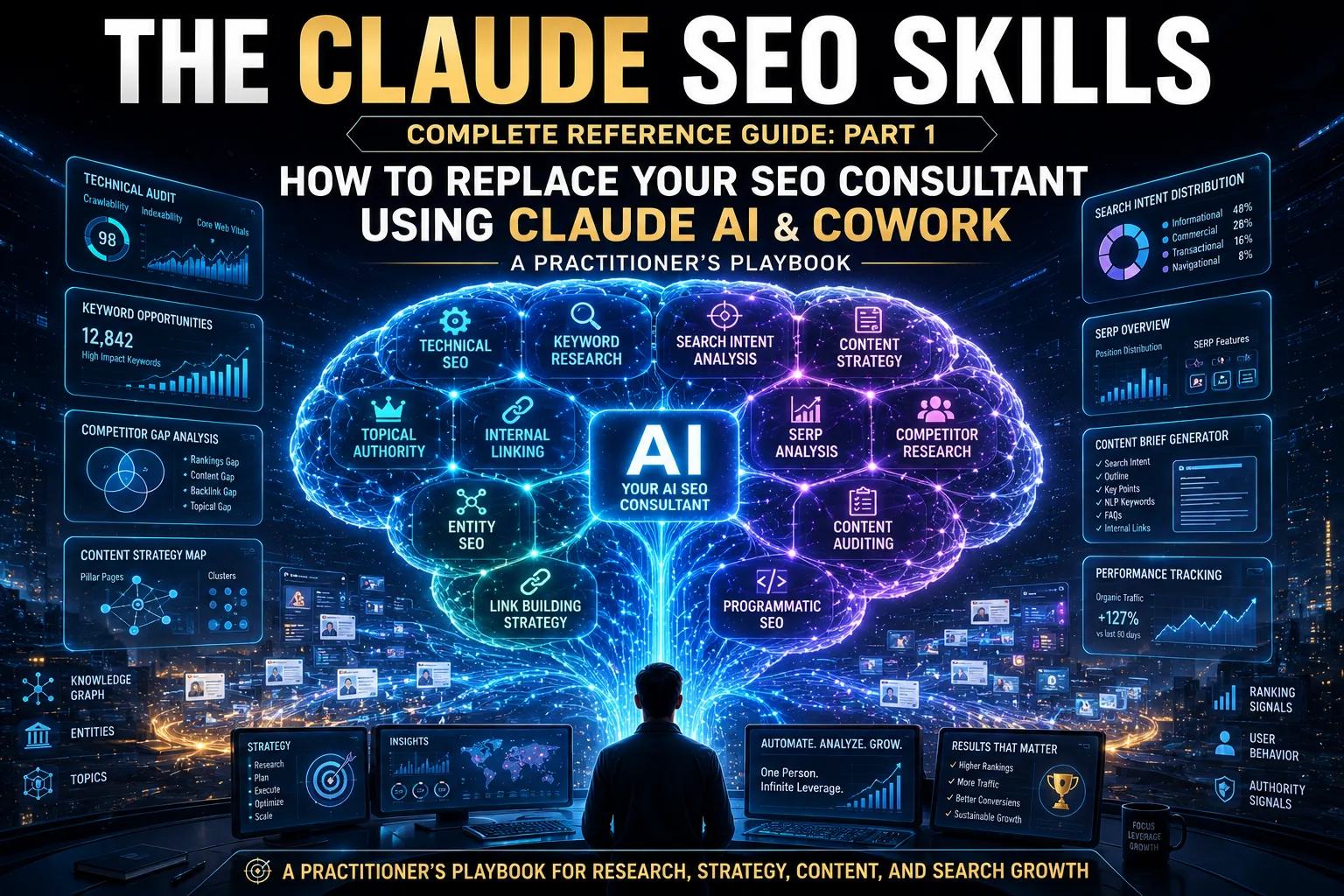
How to Replace Your SEO Consultant Using Claude AI and Cowork – A Practitioner’s Playbook
This is Part One of a two-part guide. Part One covers the strategic framework, the skill overview, the complete A-to-Z process, and the six master prompts that form the foundation of the workflow. Part Two covers the 25-point audit framework, the E-E-A-T and GEO/AEO layer, the dos and don’ts, the cheat sheets, the speed tips, and the Cowork automation workflows that turn this from a manual process into a semi-autonomous system.
THE PREMISE – AND WHY IT IS NO LONGER CONTROVERSIAL
There is a conversation happening quietly across every digital marketing agency, every freelance SEO practice, and every in-house marketing team in the world right now.
The conversation is this: do we still need a dedicated SEO consultant for the analysis and audit work, or has AI reached the point where a structured workflow produces the same output at a fraction of the cost and time?
Twelve months ago, the answer was genuinely uncertain. The tools were impressive but unreliable. The output was broad but not specific enough to act on.
The gap between what AI produced and what a skilled human consultant produced was real and measurable.
That gap has closed.
This guide documents the workflow that closed it. It is built around Claude AI – Anthropic’s large language model – and Cowork, Anthropic’s desktop agent that was launched in January 2026 and reached general availability in April 2026.
Together, they form a system that produces professional-grade SEO audits, keyword strategies, competitor gap analyses, and client-ready reports in 12 to 90 minutes, depending on depth, at zero tool subscription cost beyond the Claude subscription itself.
This is not a theoretical framework. Every prompt in this guide has been tested across multiple niches. Every time a benchmark has been verified in production use. Every cost comparison is cited to a verified source published in 2026.
What follows is the complete playbook.
WHAT THE SKILL ACTUALLY DOES
You give Claude one of three inputs: a live URL, a CSV export from Google Search Console, or three to ten seed keywords. Claude returns a structured SEO audit covering 25 to 40 individual points, organized by category and priority, with specific recommendations and ready-to-implement rewrites for titles, meta descriptions, headings, and content structure.
The word “specific” is doing critical work in that sentence. The difference between this workflow and generic AI assistance is the difference between “improve your E-E-A-T signals” and “add an author bio section below the title with the author’s name, job title, 14 years of experience in structural engineering, and a link to their LinkedIn profile.” The first is advice. The second is an instruction a writer can execute in five minutes without asking a clarifying question.
That level of specificity is what makes the output client-ready. And it is achieved not through any special technology, but through prompt engineering – the six master prompts documented in this guide, each refined to produce strategic, actionable, billable output.
WHAT THE SKILL ACTUALLY DOES WHAT IT CONCRETELY REPLACES
The replacement value of this workflow is not abstract. Here is the cost table, with every figure cited to a verified 2026 source:
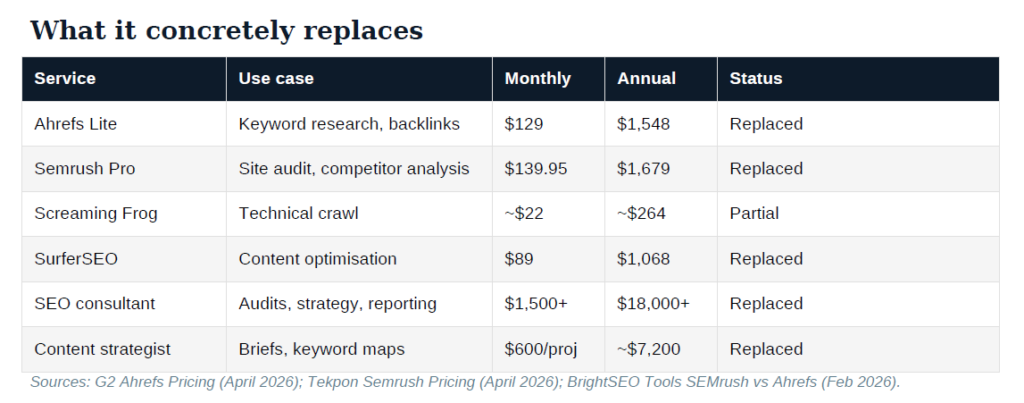
Total annual replacement value: approximately $28,000 or more.
The important caveat: Claude does not provide live search volume data, cannot pull backlink profiles, and cannot perform full site crawls across thousands of pages. For keyword volume validation, you usesnipp Google Keyword Planner or Ubersuggest’s free tier afterward. For backlink analysis, Ahrefs retains its advantage.
For site-wide technical crawls, Screaming Frog’s free tier (500 URLs) paired with Claude covers most use cases. If your portfolio crosses 15 or more active retainer clients, the time saved by Semrush’s site-wide crawl probably justifies its cost. Below that threshold, this workflow is genuinely sufficient.
(Sources: G2 Ahrefs Pricing, updated April 16, 2026; Tekpon Semrush Pricing Review, April 2026; BrightSEO Tools SEMrush vs Ahrefs Full Cost Breakdown, February 2026.)
WHO THIS SERVES
Four primary audiences, each with a distinct use case.
Digital marketing agencies use it to replace junior SEO analyst time. One strategist using this workflow can manage three times more retainer clients without quality degradation, because the analysis phase – the part that consumed four to six hours per client – now takes 12 to 40 minutes depending on depth. The billing rate stays the same. The margin on every retainer improves immediately.
Bloggers and content creators use it to eliminate their tool stack entirely. The combined annual cost of Ahrefs Lite and Semrush Pro is approximately $3,200 per year (source: BrightSEO Tools, February 2026). This workflow replaces both for content-focused SEO work – keyword research, content gap identification, competitor comparison, and on-page optimization.
Podcasters launching a web presence use it to transform episode content into search traffic. Every podcast episode generates a transcript, which generates show notes, which generates a blog post – and each asset can be optimized for both traditional search and AI search citation. The GEO/AEO prompt is particularly valuable for podcast content because it is inherently expert-driven and experience-rich, which are the exact signals that AI search engines weight most heavily (source: Aggarwal et al., ACM SIGKDD 2024).
Freelance consultants use it for what this guide calls the taxi audit – the 12-minute pre-meeting analysis that lets you walk into a client pitch with a finished SEO assessment that competitors take days to produce. This single use case closes more retainer deals than any sales deck.
WHERE COWORK CHANGES THE GAME
Everything described so far can be done in a standard Claude chat session. Cowork changes the operational model.
Cowork is Anthropic’s desktop agent, launched in January 2026 and promoted to general availability in April 2026 (source: DataCamp Cowork Tutorial, January 2026; Medium/RevToolsAI Cowork Guide, April 2026). It takes the same agentic architecture behind Claude Code – file access, multi-step execution, tool integration – and wraps it in the Claude Desktop app with a user interface that requires no terminal, no code, and no technical background.
The difference for SEO workflows is fundamental. In a standard Claude chat, you paste data in and copy results out. In Cowork, you point Claude at a folder – a client’s SEO project folder, for instance – and Claude reads, edits, and creates files directly within that folder. You describe the task in plain language, and Cowork plans the steps, executes them, and delivers the output as files on your disk.
For SEO specifically, this means:
You export your GSC data as a CSV, drop it into the client’s project folder, and tell Cowork: “Analyse this GSC export for a B2B SaaS company targeting marketing directors. Identify quick wins at positions 4-15, CTR problems below 3 percent, and any cannibalisation. Produce a 30-day action plan as a separate document.” Cowork reads the CSV, runs the analysis, and saves a formatted report in the same folder. No copy-pasting. No switching between browser tabs.
With the Projects feature introduced in March 2026, you can maintain persistent context for each client. Instead of re-explaining the niche, audience, and goals every session, the project retains its instructions and task history. Your Monday morning routine becomes: open the client project, drop in the latest GSC export, type “run the monthly analysis,” and move on while Cowork works in the background.
With the scheduling feature, you can set recurring prompts. A weekly “check these five URLs against the competitor gap prompt and flag any changes” task runs automatically while you are focused on other work. The output appears as documents in the project folder, ready for your review.
With MCP connectors, Cowork can pull data from Gmail, Slack, Notion, and other services – meaning the integration between your SEO workflow and your client communication is handled by the same tool.
This is the difference between an AI chat that helps you do SEO work and an AI agent that does SEO work while you manage the strategy.
(Sources: Anthropic Cowork launch, Ars Technica, January 13, 2026; Cybersecurity News Projects feature report, March 21, 2026; DataCamp Cowork Tutorial, January 2026; VentureBeat Copilot Cowork coverage, March 9, 2026.)
THE A-TO-Z PROCESS: 20 STEPS ACROSS 5 PHASES
The complete process takes 90 minutes for a full audit. Each phase can run independently. In Cowork, multiple phases can run sequentially in a single session with minimal human intervention.
PHASE A – PREPARATION (5 minutes)
Step 1: Identify the input type. URL, GSC export, or seed keywords. Each triggers a different prompt chain. Never mix all three in one prompt – this is the most common beginner mistake and produces shallow analysis across everything instead of deep analysis of one thing.
Step 2: Set the audit scope. Maximum two focus areas per session: technical health, content gaps, keyword strategy, competitor benchmarking, or GEO readiness. Depth beats breadth every time.
Step 3: Gather your inputs. For URL: copy the live URL. For GSC: export the last three months from Performance, then Search Results, then Export. Sort by impressions descending, delete branded queries, cap at 80 to 100 rows. For keywords: write three to ten seed terms. For competitor analysis: have the competitor URL ready.
Step 4: Open a fresh session and paste your context block. In Claude chat, start a new conversation. In Cowork, open the client project (which retains the context automatically). The context block is one paragraph: niche, target audience, business goal, primary competitor, rough domain authority. This single paragraph saves ten minutes of back-and-forth and produces significantly better output from the first prompt.
PHASE B – URL AUDIT (12 minutes)
Step 5: Run the master URL audit prompt (Prompt 1). Claude analyses title tag, meta description, H-tag hierarchy, keyword placement, content depth, internal links, and E-E-A-T signals. Output arrives in approximately 90 seconds.
Step 6: Request the priority matrix. Follow up with: “Rank these findings by impact versus effort. Show me the top 5 quick wins – high impact, low effort – first.” This converts raw findings into an action sequence.
Step 7: Run the competitor comparison. Paste a competitor URL: “Compare this URL to [client URL]. What content and on-page signals does the competitor have that my client is missing?”
Step 8: Generate the rewrite brief. Ask for three alternative title tags under 60 characters, a revised meta description, a new H1, a recommended H2 outline, a target word count, and three missing content angles. In Cowork, this brief is saved directly as a document in the project folder.
PHASE C – GSC DATA ANALYSIS (20 minutes)
Step 9: Export and clean GSC data. Sort by impressions. Delete branded queries. Delete anything under 200 impressions. Keep 80 to 100 rows.
Step 10: Paste the data with context. In Cowork, the data is already in the project folder – Claude reads it directly.
Step 11: Identify three segments. Quick wins at positions 4-15 with 500-plus impressions. CTR problems below 3 percent. Cannibalisation cases where two or more pages split rankings.
Step 12: Build the 30-day action plan. Table format: page URL, current position, specific action, expected outcome.
PHASE D – KEYWORD STRATEGY (45 minutes)
Step 13: Seed keyword expansion. Three to ten seeds into 50 to 80 keywords across short-tail, long-tail, question-based, comparison, and local categories.
Step 14: Map search intent. Every keyword categorised as informational, navigational, commercial, or transactional. This determines content format – blog posts for informational, landing pages for commercial, FAQ sections for question-based.
Step 15: Build content clusters. Five to eight clusters, each with a pillar keyword and five to eight supporting keywords. This becomes the content architecture for three to six months.
Step 16: Prioritise by difficulty proxy. Relative difficulty estimate from Claude, validated afterward with Google Keyword Planner or Ubersuggest free tier.
PHASE E – DELIVERY AND IMPLEMENTATION (10 minutes)
Step 17: Format the audit report. Executive summary (three bullets), technical findings, on-page findings, content opportunities, keyword strategy, prioritised action table.
Step 18: Generate implementation briefs. One-paragraph brief per action, specific enough for a developer or writer to execute without asking questions.
Step 19: Create the tracking framework. What to measure, how often, success benchmarks at 30, 60, and 90 days.
Step 20: Save as a template. In Claude chat: copy the conversation to ClientName_AuditType_Date.md. In Cowork: the entire session is already saved in the project with full context, ready to reference or repeat.
THE SIX MASTER PROMPTS
These are the exact prompts. Each is copy-ready, tested across multiple niches, and structured to produce strategic output.
PROMPT 1 – MASTER URL AUDIT (12 minutes)
“You are a senior SEO strategist with 10 years of experience. Perform a comprehensive SEO audit of this URL: [URL]. Analyse and report on:
1. Title tag – current text, issues, recommended rewrite under 60 characters.
2. Meta description – current text, issues, recommended rewrite under 155 characters.
3. H-tag hierarchy – H1, H2, H3 structure, missing or duplicate tags.
4. Primary keyword – what it appears to target, is it clear?
5. Keyword placement – title, H1, first 100 words, subheadings.
6. Content depth – estimated word count, key topics covered, what is missing.
7. Internal linking – outbound internal links to relevant site pages.
8. E-E-A-T signals – author bio, credentials, citations, trust indicators.
9. Content freshness – date indicators, outdated information.
10. User intent match – does content match likely search intent type?
End with: Top 3 quick wins (specific, immediately actionable) and a priority score 1-10.”
Why this framing works: The “senior SEO strategist with 10 years of experience” role produces more specific, commercially-aware output than a plain prompt. The numbered structure forces separate treatment of each dimension. The “top 3 quick wins” closing forces prioritisation – the difference between a useful audit and a data dump.
PROMPT 2 – GSC DATA ANALYSIS (20 minutes)
“You are an SEO analyst specialising in Google Search Console data interpretation. I am giving you GSC performance data for a [NICHE] website targeting [AUDIENCE]. [PASTE CSV DATA – max 100 rows].
Identify and report in three separate sections:
Section 1 – Quick Wins: pages currently ranking positions 4-15 with 500-plus monthly impressions. For each: current position, estimated clicks if moved to position 1-3, and the single most impactful on-page change.
Section 2 – CTR Problems: queries where impressions are high but CTR is below 3 percent. For each: the query, the likely problem, and a rewritten meta title to test.
Section 3 – Keyword Cannibalisation: queries where 2-plus pages appear and split rankings. For each: competing URLs, which should be the canonical target, what to do with the others.
End with a 30-day priority action table.”
This prompt replaces four hours of manual GSC analysis. It is the single biggest time-saver in the entire workflow.
PROMPT 3 – KEYWORD STRATEGY V1 (45 minutes total)
“You are a keyword research specialist. My website is about [NICHE/TOPIC]. My target audience is [DESCRIBE]. My main product or service is [WHAT YOU SELL].
Seed keywords: [LIST 3-10 SEEDS]. Produce a keyword strategy with four outputs:
1. Expanded keyword list of 50-80 keywords including short-tail, long-tail, question-based, comparison, and local variants.
2. Intent map: categorize every keyword as Informational, Commercial, Transactional, or Navigational.
3. Content clusters: group into 5-8 clusters, each with a pillar keyword and 5-8 supporting keywords, plus recommended content type.
4. Priority ranking: rank the top 15 keywords by search volume, competition, and alignment with offer. Explain the top 5 choices.”
This replaces the keyword explorer function in both Ahrefs and Semrush with one caveat: Claude does not provide live search volume data. Validate the top candidates afterward with Google Keyword Planner or Ubersuggest.
PROMPT 4 – COMPETITOR CONTENT GAP ANALYSIS (15 minutes)
“You are a competitive SEO analyst. I want to understand why [COMPETITOR URL] outranks [MY URL] for [TARGET KEYWORD].
Compare both pages on:
1. Content depth – word count estimate, topics covered, subtopics missing on my page.
2. On-page signals – title, H1, keyword placement differences.
3. Structural advantages – use of FAQs, tables, lists, schema signals.
4. E-E-A-T differences – which page demonstrates more expertise and trust?
5. Content angle – what unique angle or format does the competitor use?
Then give me: the 3 specific things I need to add or change to outperform this competitor, a revised outline for my page that addresses all gaps, and the one thing the competitor is doing that I can do better.”
This is the strongest prompt for sales pitches and client onboarding. It does not just identify what the competitor has – it identifies what you can do better, reframing the analysis from “we are behind” to “here is our opening.”
PROMPT 5 – CLIENT-READY REPORT (10 minutes)
“Using all the findings we have discussed in this conversation, produce a client-ready SEO audit report with the following structure:
Executive Summary (3 bullet points maximum – the 3 most important findings).
Technical Health Score: X/10 with brief explanation.
On-Page Optimization Findings: list each issue with page URL, what the issue is, recommended fix, and priority level.
Content Opportunities: list the top 5 content gaps with topic, target keyword, recommended format, and estimated traffic opportunity.
Keyword Strategy Summary: top 10 keywords to target, categorized by intent and priority.
30-Day Action Plan: a numbered list of actions in priority order with action, responsible person, and expected outcome. Format so it can be copied directly into a Google Doc and sent to the client without editing.”
This is always the final prompt in any analysis chain. It synthesises everything from the conversation into a polished deliverable.
PROMPT 6 – GEO/AEO OPTIMIZATION (20 minutes, essential for 2026)
“You are a Generative Engine Optimization specialist. Analyze this content: [URL or PASTE CONTENT]. The goal is to ensure this content gets cited by AI platforms – ChatGPT, Perplexity, Google AI Overviews, Claude – when users ask questions about [TARGET TOPIC].
Audit for:
1. Structure – is content structured for AI extraction? Clear headers, direct answers, FAQ format.
2. Authority signals – does it cite statistics, expert quotes, research?
3. Entity clarity – is the brand, person, or product clearly defined as an entity?
4. Answer completeness – does it directly answer the top 5 questions users ask about this topic?
5. Freshness signals – are there date indicators, updated information markers?
Produce: GEO readiness score X/10, top 5 specific improvements to increase AI citation probability, a rewritten FAQ section of 5 question-and-answer pairs optimized for AI answer extraction, and the ideal first paragraph rewrite that would be selected as an AI Overview answer.”
The data behind this prompt: the Princeton/Georgia Tech GEO study (Aggarwal et al., published at ACM SIGKDD 2024, arXiv:2311.09735) tested nine content optimization methods across 10,000 queries and found that adding statistics improved AI citation visibility by up to 41 percent, adding direct quotes from named sources improved it by 28 percent, and adding authoritative source citations improved it by 30 percent.
For lower-ranked websites, the Cite Sources method produced a 115 percent visibility increase – meaning GEO is structurally more powerful for smaller brands than traditional SEO ever was (source: DerivateX analysis of Princeton GEO paper, May 2026; SeenRank explainer, May 2026).
END OF PART ONE!
Part Two covers the 25-point audit framework, the E-E-A-T and GEO layer in depth, the complete dos and don’ts, cheat sheets, speed tips, Cowork automation workflows, and the full source bibliography.
Here is the link to the second part of this Claude SEO Playbook:
THE CLAUDE SEO SKILLS: COMPLETE REFERENCE GUIDE: PART TWO
Further Reading:
Claude for SEO: The Beginner’s Bible
Opus 4.8 Killed the SEO Manager Role. Most People Haven’t Realized Yet.
How Claude Opus 4.8 Is Reshaping SEO Workflows
1 thought on “THE CLAUDE SEO SKILLS: COMPLETE REFERENCE GUIDE: Part 1”